Multi-Tenancy
Implement multi-tenant applications with organization-scoped resources.
Overview
EZ-Console supports multi-tenancy through organization-based resource isolation. Resources belong to organizations, and users can be members of multiple organizations with different roles in each. Tenant lifecycle for organizations (create, list, detail, membership, and roles in scope) is covered by built-in admin UI and server logic—see Organization Management.
Multi-Tenancy Model
Organization Structure
Organization
├── Users (organization members)
├── Roles (organization-specific roles)
├── Resources (organization-scoped data)
└── Settings (organization-specific settings)
Resource Scoping
Resources are scoped to organizations:
- Users can belong to multiple organizations
- Resources belong to a single organization
- Permissions are organization-scoped
Organization Context
Getting Organization ID
In controllers, get organization ID from header:
func (c *ProductController) ListProducts(ctx *gin.Context) {
    // Get organization ID from header
    orgID := ctx.GetHeader("X-Scope-OrgID")

    if orgID == "" {
        // Get from user's default organization
        userID, _ := ctx.Get("user_id")
        user, _ := c.svc.GetUser(ctx.Request.Context(), userID.(string))
        orgID = user.DefaultOrganizationID
    }

    // Query organization-scoped resources
    products, err := c.service.GetProductsByOrganization(ctx, orgID)
    // ...
}
Setting Organization Context
Frontend automatically includes organization ID in requests:
// Set organization ID
localStorage.setItem('orgID', organizationId);

// API client automatically includes header
const orgID = localStorage.getItem('orgID');
if (orgID) {
    config.headers['X-Scope-OrgID'] = orgID;
}
Organization-Scoped Models
Model Definition
type Product struct {
    ID             string    `gorm:"primaryKey"`
    OrganizationID string    `gorm:"type:varchar(36);index"` // Organization scope
    Name           string
    Price          float64
    CreatedAt      time.Time
    UpdatedAt      time.Time
}

func (p *Product) TableName() string {
    return "t_product"
}
Querying by Organization
func (s *ProductService) GetProductsByOrganization(ctx context.Context, orgID string) ([]Product, error) {
    var products []Product
    err := s.db.Where("organization_id = ?", orgID).Find(&products).Error
    return products, err
}
Organization Management
EZ-Console ships with organization administration in the product UI and the corresponding backend APIs. Operators can list and search organizations, create them, open detail views, and manage membership (including assigning users with organization-scoped roles) without writing custom admin screens for the baseline workflow.
The screenshots below show the built-in Organization Management list and the Add User flow on an organization’s detail page.
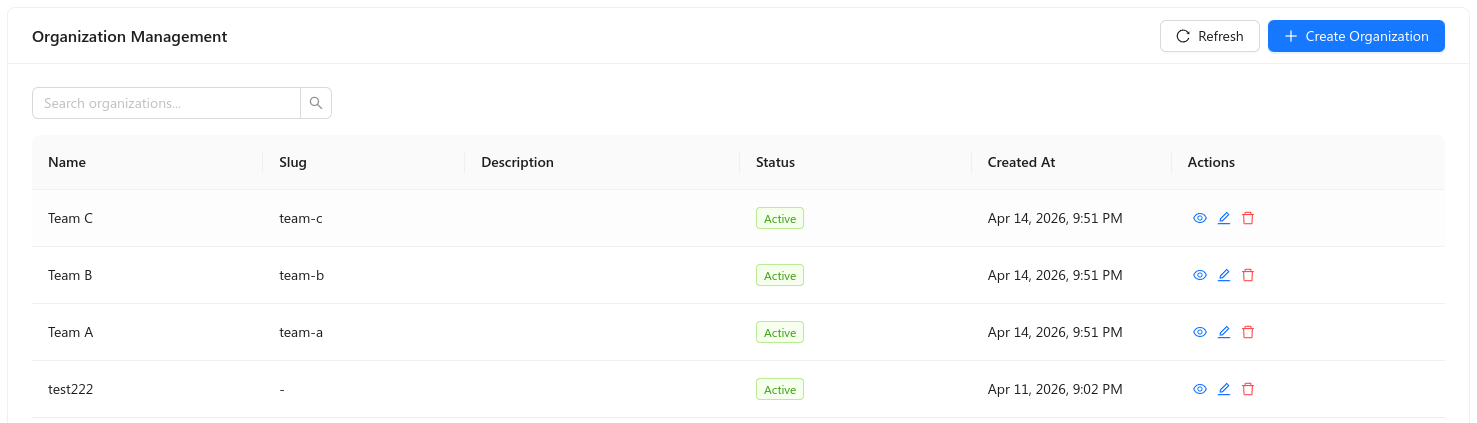
In the list view you can refresh data, create an organization, filter by search, and use row actions (view, edit, delete). Each row shows core fields such as name, slug, description, status, and created time.
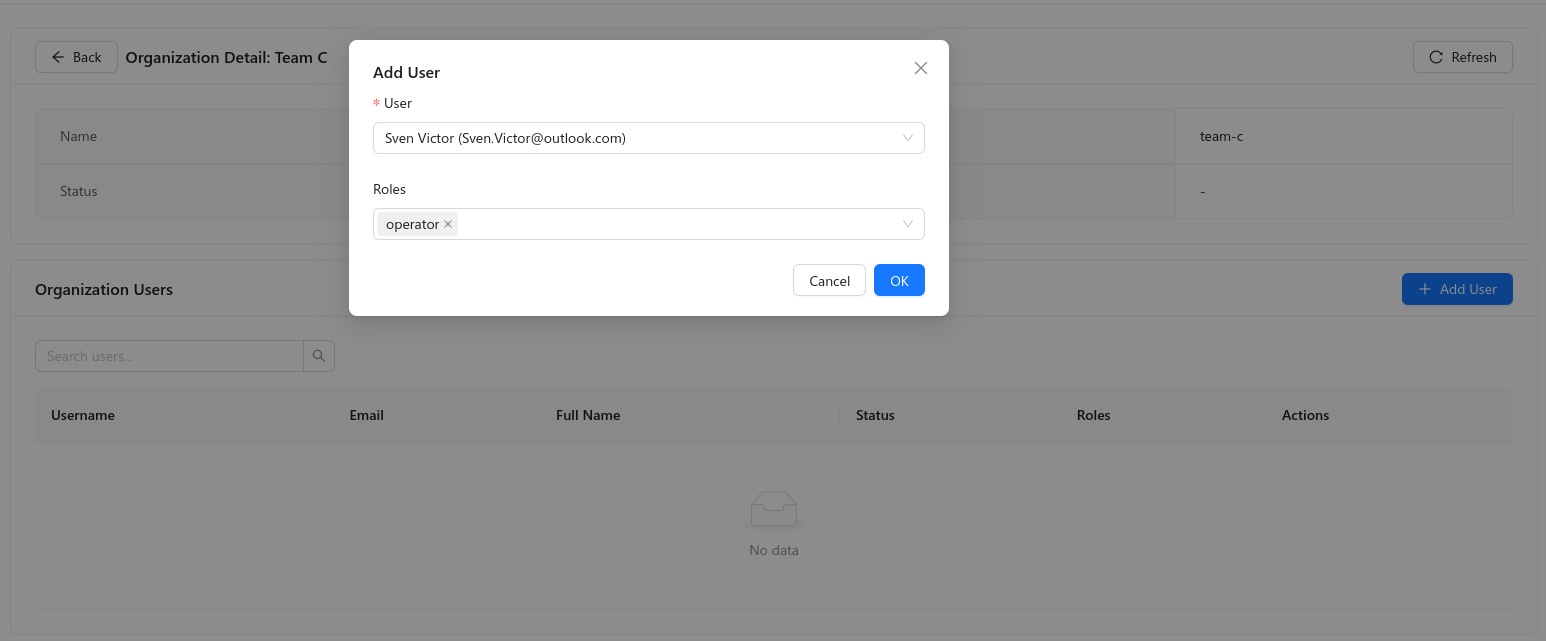
On the organization detail screen you see organization metadata, a searchable Organization Users table, and Add User, where you pick an existing user and one or more organization-level roles (for example operator) before confirming.
Permission Isolation
Organization-Scoped Permissions
Permissions are evaluated within organization context:
func (s *PermissionService) CheckPermission(ctx context.Context, userID, orgID, permission string) (bool, error) {
    // Get user's roles in organization
    roles, err := s.GetUserRolesInOrganization(ctx, userID, orgID)
    if err != nil {
        return false, err
    }

    // Check if any role has permission
    for _, role := range roles {
        hasPermission, err := s.RoleHasPermission(ctx, role.ID, permission)
        if err != nil {
            return false, err
        }
        if hasPermission {
            return true, nil
        }
    }

    return false, nil
}
Best Practices
Always Scope Queries
// ✅ Good: Scoped query
db.Where("organization_id = ?", orgID).Find(&products)

// ❌ Bad: Global query (security risk)
db.Find(&products)
Related Topics
- Authentication & Authorization - Auth implementation
- Extending Built-in Modules — Organization-aware extensions
Need help? Ask in GitHub Discussions.